Alarmed3.5
Publisher Description


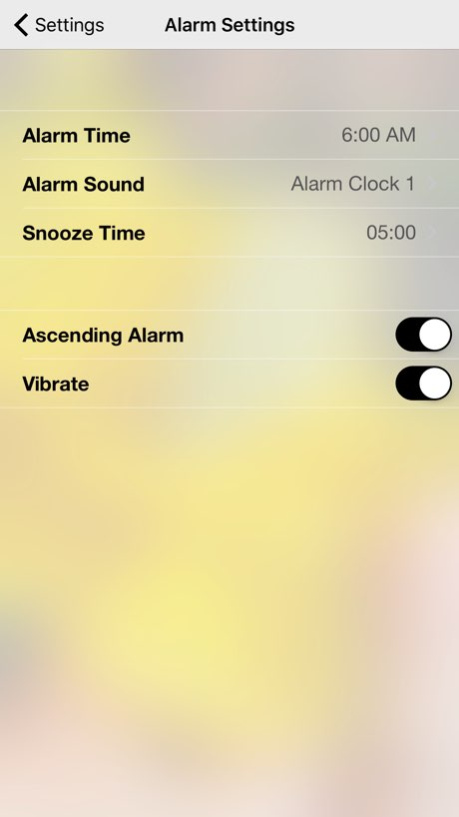

Alarmed is a simple alarm with a clean and fresh interface.
You can:
- sync settings between devices using iCloud
- set your alarm
- choose your alarm sound, including music from your personal library or from a large assortment of included alarms
- choose a custom snooze time
- choose to have your iPhone vibrate
- wake up peacefully with an ascending alarm
- pinch to adjust the size of the clock
- night mode darkens the screen
Alarmed supports a photo slideshow presented from Flickr photos. You can choose to load photos based on a search term provided by Fays Lane Labs, provided by you, or just choose to view some interesting photos of the day.
Alarmed is an active development. New features are always in the works.
Version History - enhanced background choices
- stability issues 3.5 11/08/2016 - small UI enhancements 3.4 12/16/2014 - small bugs squashed 3.3 11/19/2014 - small UI enhancements
- more reliable download of Flickr search term from Fays Lane Labs
- small bug fixes 3.2 11/10/2014 - small bug fixes 3.1 10/25/2014 - iCloud syncing between devices
- updated UI with frosted view
- more default alarms 3.0 09/17/2014 - updated Flickr API
- personal music no longer displays media in the cloud 2.3 06/07/2014 - added an ascending alarm
- fixed vibrate to continuously vibrate until snooze or alarm is shut off
- various improvements and bug fixes 2.2 04/30/2014 - user is alerted if they attempt to choose music containing DRM for the alarm 2.1 12/31/2013 Now you can choose music from your personal library as your alarm sound! 2.0 12/11/2013 - per request, added more soothing alarms including lake waves, ocean waves, and rain
- minor bug fixes 1.2 11/13/2013 - updated interface
- clock size is now adjustable using pinch gesture 1.1 10/23/2013 1.0 09/27/2013
About Alarmed
The company that develops Alarmed is Jarrod Luker. The latest version released by its developer is 3.5.
To install Alarmed on your iOS device, just click the green Continue To App button above to start the installation process. The app is listed on our website since 2026-10-08 and was downloaded 4 times. We have already checked if the download link is safe, however for your own protection we recommend that you scan the downloaded app with your antivirus. Your antivirus may detect the Alarmed as malware if the download link is broken.
How to install Alarmed on your iOS device:
- Click on the Continue To App button on our website. This will redirect you to the App Store.
- Once the Alarmed is shown in the iTunes listing of your iOS device, you can start its download and installation. Tap on the GET button to the right of the app to start downloading it.
- If you are not logged-in the iOS appstore app, you'll be prompted for your your Apple ID and/or password.
- After Alarmed is downloaded, you'll see an INSTALL button to the right. Tap on it to start the actual installation of the iOS app.
- Once installation is finished you can tap on the OPEN button to start it. Its icon will also be added to your device home screen.
Program Details
System requirements
Download information
Pricing
Version History
version 3.5
posted on 2026-10-08
Version History - enhanced background choices
- stability issues 3.5 11/08/2016 - small UI enhancements 3.4 12/16/2014 - small bugs squashed 3.3 11/19/2014 - small UI enhancements
- more reliable download of Flickr search term from Fays Lane Labs
- small bug fixes 3.2 11/10/2014 - small bug fixes 3.1 10/25/2014 - iCloud syncing between devices
- updated UI with frosted view
- more default alarms 3.0 09/17/2014 - updated Flickr API
- personal music no longer displays media in the cloud 2.3 06/07/2014 - added an ascending alarm
- fixed vibrate to continuously vibrate until snooze or alarm is shut off
- various improvements and bug fixes 2.2 04/30/2014 - user is alerted if they attempt to choose music containing DRM for the alarm 2.1 12/31/2013 Now you can choose music from your personal library as your alarm sound! 2.0 12/11/2013 - per request, added more soothing alarms including lake waves, ocean waves, and rain
- minor bug fixes 1.2 11/13/2013 - updated interface
- clock size is now adjustable using pinch gesture 1.1 10/23/2013 1.0 09/27/2013
version 3.5
posted on 2026-09-03
Version History This app has been updated by Apple to prepare for watchOS 27 compatibility. No new features are included.
- enhanced background choices
- stability issues 3.5 11/08/2016 - small UI enhancements 3.4 12/16/2014 - small bugs squashed 3.3 11/19/2014 - small UI enhancements
- more reliable download of Flickr search term from Fays Lane Labs
- small bug fixes 3.2 11/10/2014 - small bug fixes 3.1 10/25/2014 - iCloud syncing between devices
- updated UI with frosted view
- more default alarms 3.0 09/17/2014 - updated Flickr API
- personal music no longer displays media in the cloud 2.3 06/07/2014 - added an ascending alarm
- fixed vibrate to continuously vibrate until snooze or alarm is shut off
- various improvements and bug fixes 2.2 04/30/2014 - user is alerted if they attempt to choose music containing DRM for the alarm 2.1 12/31/2013 Now you can choose music from your personal library as your alarm sound! 2.0 12/11/2013 - per request, added more soothing alarms including lake waves, ocean waves, and rain
- minor bug fixes 1.2 11/13/2013 - updated interface
- clock size is now adjustable using pinch gesture 1.1 10/23/2013 1.0 09/27/2013
version 3.5
posted on 2026-08-21
Version History This update from Apple will improve the functionality of this app. No new features are included.
- enhanced background choices
- stability issues 3.5 11/08/2016 - small UI enhancements 3.4 12/16/2014 - small bugs squashed 3.3 11/19/2014 - small UI enhancements
- more reliable download of Flickr search term from Fays Lane Labs
- small bug fixes 3.2 11/10/2014 - small bug fixes 3.1 10/25/2014 - iCloud syncing between devices
- updated UI with frosted view
- more default alarms 3.0 09/17/2014 - updated Flickr API
- personal music no longer displays media in the cloud 2.3 06/07/2014 - added an ascending alarm
- fixed vibrate to continuously vibrate until snooze or alarm is shut off
- various improvements and bug fixes 2.2 04/30/2014 - user is alerted if they attempt to choose music containing DRM for the alarm 2.1 12/31/2013 Now you can choose music from your personal library as your alarm sound! 2.0 12/11/2013 - per request, added more soothing alarms including lake waves, ocean waves, and rain
- minor bug fixes 1.2 11/13/2013 - updated interface
- clock size is now adjustable using pinch gesture 1.1 10/23/2013 1.0 09/27/2013
version 3.5
posted on 2016-11-08
Nov 8, 2016
Version 3.5
This app has been updated by Apple to display the Apple Watch app icon.
- enhanced background choices
- stability issues
version 3.5
posted on 2016-11-08
This app has been updated by Apple to display the Apple Watch app icon.
- enhanced background choices
- stability issues
